


Desktop app Windows · macOS · Linux

Put an agent to work in your systems

An AI agent handles recurring work across your company’s systems. For example, it can retrieve a job from your TMS, check the rate in Excel and compare it with an invoice in Symfonia. We also build connectors for your in-house apps. You decide what the agent can access and when it asks for approval.

What can be automated

Needless clicking between systems. Copying data from one browser tab to another. Searching for information. Verifying data. Cost estimates. Reading scans. Filling in documents. And any other computer work someone does the same way every day.

What Dumpling Bot does

Each employee uses the agent app. Data comes from connected company systems, and access depends on the employee’s role.

Compares documents

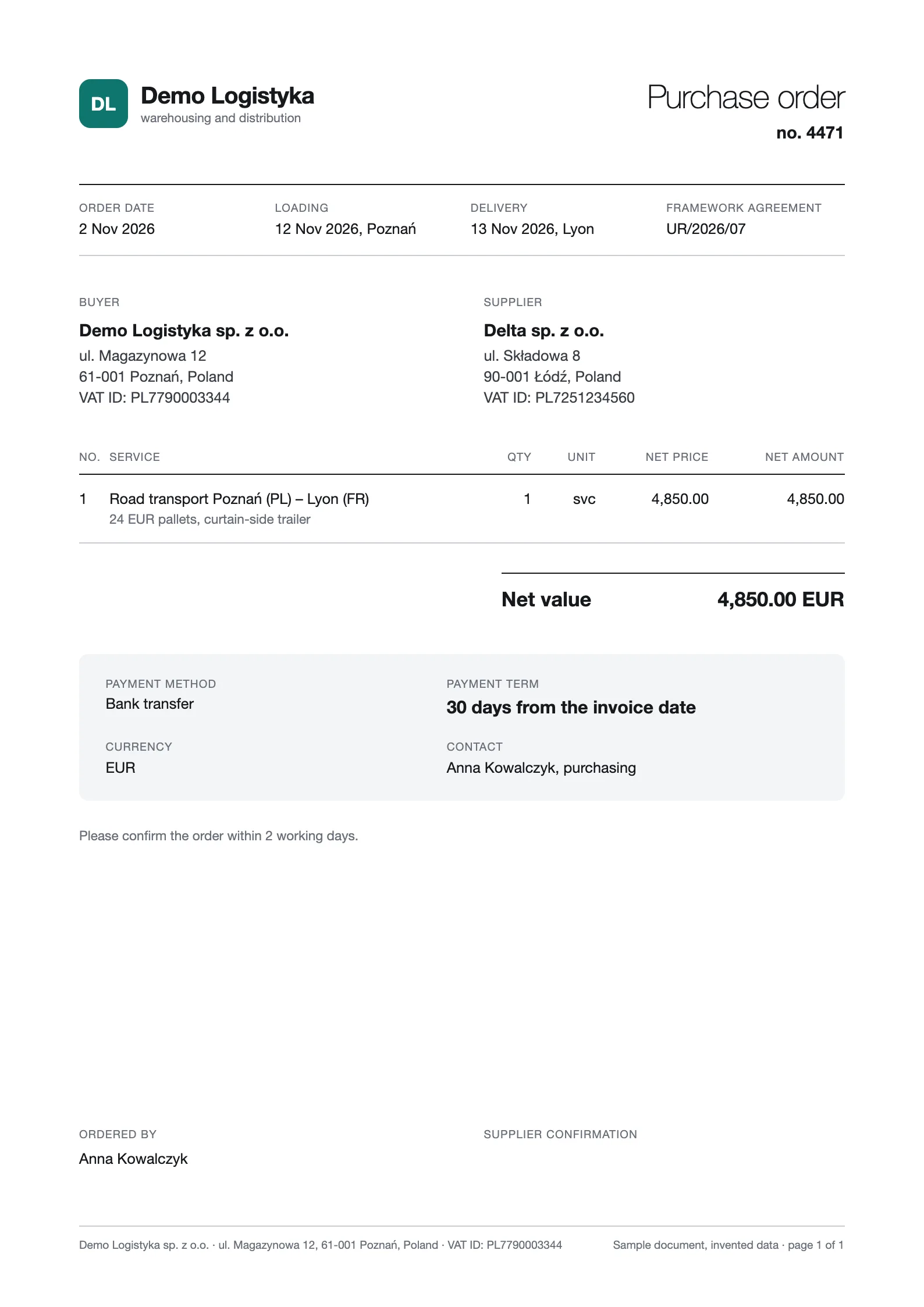
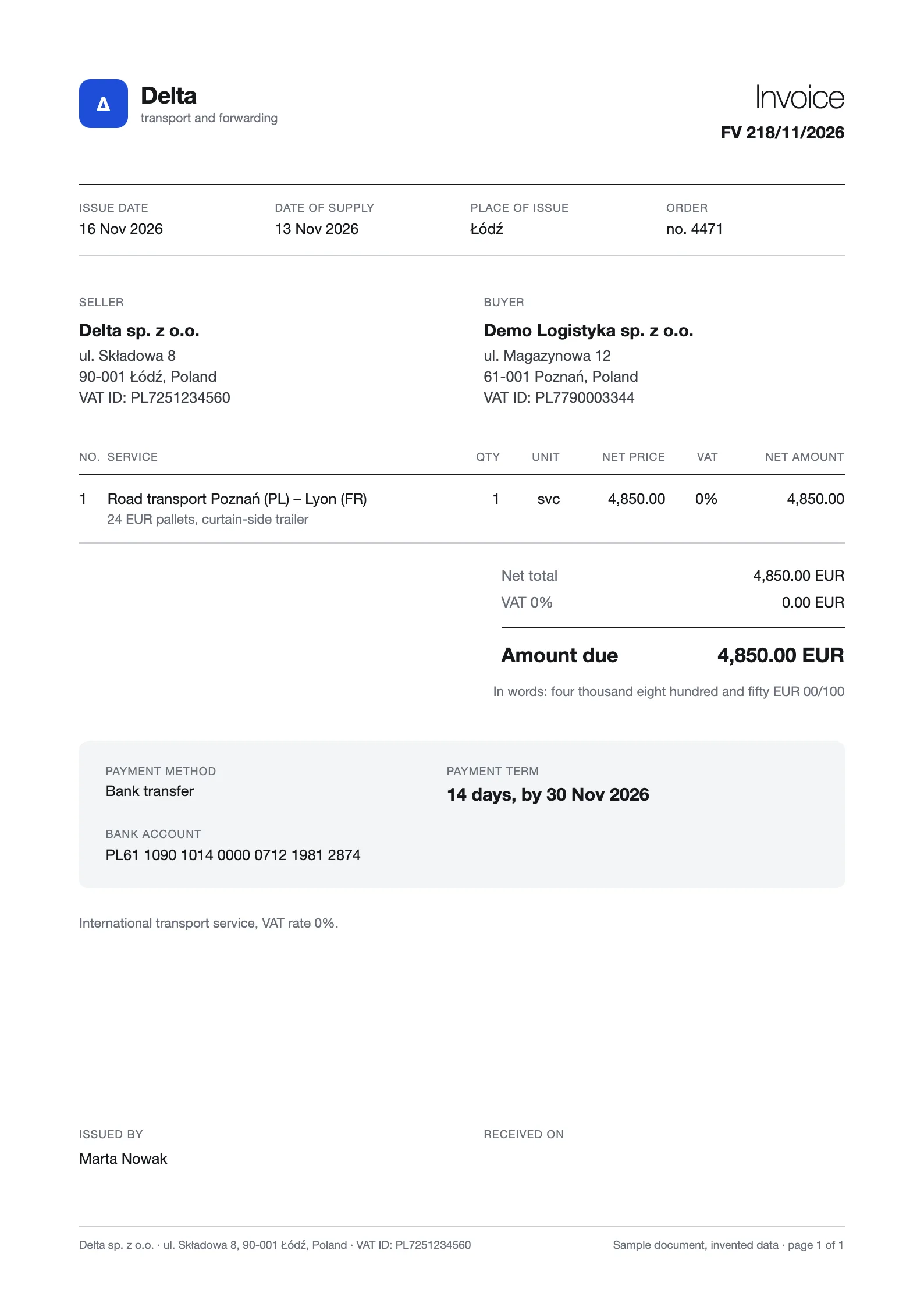
The agent compares the order, the invoice and the ERP record. It uses company connections to access every document shared with accounting.

Mail, Grace WilsonSearchGW

InboxGrace Wilson

  • Anna KowalczykOrder 4471 for DeltaGrace, for your records: the order we sent
  • Transbud S.A.Balance confirmationPlease find the balance confirmation as of
  • Amy, salesNotes from the Delta callThe notes from the call are in the Sales channel

Order 4471 for Delta

AAnna KowalczykTo: Grace Wilson

Grace, for your records: order 4471, which went out to Delta today.

Order_4471.pdf87 KB
EOrder 4471
erp.company.local/orders/4471
ERPDashboardOrdersPurchase invoicesPartnersSettlements

Orders / 4471

Order 4471Completed

Supplier
Delta sp. z o.o.
Order date
2 Nov 2026
Currency
EUR
Quantity
24 pallets
Net amount
4,850.00
Payment term
30 days
No.ItemQtyAmount
1Transport Poznań – Lyon, 24 EUR pallets1 svc4,850.00

Documents

Order_4471.pdf2 Nov 2026
Order confirmation Delta.pdf3 Nov 2026
Mail, accounting@SearchAC

Inboxaccounting@

  • Delta sp. z o.o.Invoice FV 218 for order 4471Hello, please find attached the invoice for
  • Transbud S.A.Invoice FV/11/204Attached is the invoice for November
  • Baltic CargoCorrection note 3/11We are sending a correction note for invoice

Invoice FV 218 for order 4471

DDelta sp. z o.o.To: Accounting

Hello, please find attached the invoice for the Poznań–Lyon transport of 13 November.

Invoice_FV_218.pdf87 KB
Partners.xlsx

FileHomeInsertFormulasData

D2fx30 days

ABCDE
1PartnerCityCurrencyPayment term
2Delta sp. z o.o.ŁódźEUR30 days
3Transbud S.A.KatowicePLN14 days
4Baltic CargoGdyniaPLN21 days
5Muster Logistik GmbHWienEUR45 days
6EuroCargo Demo Sp. z o.o.GdańskPLN30 days
7Demo Produkcja S.A.WrocławPLN60 days
8
9
10

PartnersArchive

Sales | Microsoft TeamsSearchGW
Demo LogistykaGeneralSalesAccountingTransport

SalesPostsFiles

A

Amy, salesI spoke with Delta about the Lyon transport from order 4471.

A

Amy, salesAgreed: 24 pallets, EUR 4,850, payment term 30 days. Entering it in the ERP.

G

Grace WilsonThanks, got it.

Agreements – Google Drive
drive.google.com/drive/folders/agreements
+ NewMy DriveShared drivesShared with meRecent

Shared drives › Accounting › Agreements

NameModified
Framework agreement Delta.pdf14 Jul 2026
Amendment no. 1 Delta.pdf2 Sep 2026
Framework agreement Transbud.pdf8 Jan 2026

Framework agreement Delta.pdf, page 3

§ 5. Payment terms1. The client pays the fee by bank transfer within 30 days of the invoice date.

Dumpling Bot

The invoice says 14 days. Every other source says 30 days.

Payment term

The company shares this mailbox through its Outlook connector. The agent retrieves the order PDF through that connection.


Works in all your company’s systems

We build connectors for the apps you already use, including software written specifically for your business. If a system has no API, the agent can use its browser interface or work with files you share.

Finance and ERP

  • Symfonia
  • Comarch ERP Optima
  • enova365
  • KSeF

Transport and sales

  • Your TMS
  • TIMOCOM
  • BaseLinker
  • Allegro
  • InPost
  • Your in-house app

Office and communication

  • Excel
  • Outlook
  • Teams
  • Gmail
  • OneDrive
  • Google Drive

DumplingBot

Your system via API. The agent pulls new orders and writes back statuses through a company connection, within the role’s permissions.

  1. The payment term is 14 days instead of 30. An email asking for a correction waits for your approval.

  2. Found CMR/2026-09-23/729328 (a test file) and drafted a reply with it attached.Open sample CMR (PDF)

  3. Checked the ledger in Symfonia: two invoices are overdue. The reply is ready to send.

  4. Downloaded the invoice and matched it to order 4460. Amounts and items agree.

  5. There are 10 units in stock. Asks whether to order 2 more from the supplier.

  6. Prepared the list of transfers. It waits for the accountant’s approval.

Email, WhatsApp and Teams on one list

Notifications from KSeF, BaseLinker and the accounting system land on the same list. Each item shows what the agent has already done and what waits for your decision.

Public registriesconnector

  • VAT whitelistVAT status, bank accounts
  • KRScompany extract, board
  • CEIDGentry, status
  • VIESEU VAT
  • GUSREGON, activity codes

Checks public registries

You give a tax ID and the agent checks the company in the Polish VAT whitelist, KRS, CEIDG, VIES and GUS. Every fact comes with its source and read date.

Delta sp. z o.o.Tax ID 000-111-22-33

  • Active VAT payer
  • Invoice bank account is on the whitelist
  • KRS entry up to date
  • Board changed 3 weeks ago

Verifies partners and documents

Before you pay or sign a contract, the agent checks the partner and the documents. You get a short report: what matches and what needs explaining.

Application to the municipalityexample setup

Document
application to the municipal office
Delivery
e-Doręczenia (Polish e-delivery)
In the case file
proof of delivery and the reply

Set up for a specific company, within its permissions

Prepares documents itself

It fills in a letter, an application or a summary in Excel with data already in your systems. A person checks and approves. Sending through e-Doręczenia and collecting replies is set up for each company and its permissions, not in advance for every office.

Everyone gets their own agent

Each employee has an agent. The company connects its systems once and sets access for each role. Shared processes and the activity log stay on the company server.

  • GraceAccounting
  • PeterSales
  • ClairePurchasing
Your company servershared processes, connected apps, the log
13:07Grace Wilson via the agentBrowserERP read: order 4471read
13:07Grace Wilson via the agentBrowserERP screenshot: order 4471read
13:07Grace Wilson via the agentEmailemail to Delta sp. z o.o.: FV 218, payment termapproved

Records every step

In the log the company admin sees what the agent read, what it sent and who approved it, with the time and the account.

ToDelta sp. z o.o.

SubjectFV 218: payment term

The invoice says 14 days, in order 4471 we agreed on 30. Please send a corrected invoice.

Asks for approval where you want it

The agent can send and change things on its own. We suggest a specialist has the last word on the steps that matter. You decide where the agent asks.

Invoice FV 218 check6 steps
  1. In the browser built into the app, signed in as Grace. Reads order 4471.

  2. The accounting@ mailbox. Opens the attachment FV 218.

  3. VAT

    VAT whitelist: the account on the invoice belongs to Delta sp. z o.o.

  4. Amount and quantity match. Payment term: 14 days instead of 30.

  5. To Delta sp. z o.o.: the invoice says 14 days, in order 4471 we agreed on 30. Please send a corrected invoice.

  6. Hold the payment until the corrected invoice arrives.

Knows your company’s processes

The rules come from the specialist who knows the work. We write them down step by step as a process. An employee starts it with one command, and the agent goes through the steps in order and stops where approval is needed.

From inquiry to delivery

An example from a five-person transport company. The agent starts with one person, in sales, and you add the rest of the team when you are ready.

A quote from your own rate sheet

Emma gets an inquiry from a client. The agent reads it from the email, prices it from the company rate sheet and shows every step. When a rate is missing, it does not guess: it asks a specialist.

The rate sheet and rules are samples. In your company the agent follows your own procedure.

Inquiry: Delta sp. z o.o.9:12

Poznań → Lyon, 24 pallets, curtainsider, standard delivery.

LoadingPoznań

Quote Q‑1182Rate_sheet_2026.xlsx

  1. Full truck (12+ pallets), France: EUR 1.45/km × 1,290 kmEUR 1,870.50
  2. Fuel surcharge: 8% of the rateEUR 149.64

Total net, rounded up to EUR 10EUR 2,030

draft, waits for your approval

Handover to operations

The client accepts the offer. Emma’s agent opens the job and sends each person only what they need for their part, in the app they already work in.

The agent works for
  • Emmasaleswith agent
  • Katedispatchwith agent
  • Graceaccountingwith agent
  • Markdriverwith agent
  • Paulhead of forwardingwith agent

To start, the agent works for Emma. The rest of the team gets messages as before: in Teams, by email and on WhatsApp.

When everyone has the agent, the handover starts the next steps for each recipient straight away.

Job Z/11/0412accepted by client

Poznań → Lyon · 24 pallets · curtainsider · EUR 2,030

  • Kate, dispatch Teamsto send

    Gets: The job: route, pallets, trailer, dates and the loading contact.

    Agent: enters the job into the TMS the company already uses.

  • Grace, accounting Outlookto send

    Gets: Invoice data: price, 30-day payment term, tax ID checked on the VAT whitelist.

    Agent: adds the client in Symfonia and reminds about the invoice after unloading.

  • Mark, driver WhatsAppto send

    Gets: Loading address and time, job number, warehouse phone.

    Agent: sends dispatch a photo of the signed CMR after unloading.

  • Paul, head of forwarding Teamsto send

    Gets: In short: client, route and the price from the rate sheet.

    Agent: collects the week’s jobs into one summary.

Dumpling Bot in your company

We roll it out ourselves, starting with one person and one process. We measure the time per case before and after, so the result can be counted.

Book a call
  • Accounting
  • Sales
  • Purchasing

We list the tools

For each role, the apps it works in.

  • Outlookaccounting@yourcompany.comconnected
  • ExcelPartners.xlsxconnected
  • BrowserGrace’s profileconnected

We connect the apps

Email, spreadsheets and the systems the agent should reach.

GWGrace Wilsoninvoice checks · Accounting

We start with one person

They work with the agent on their usual cases.

check invoice FV 218 before paymentEnter

We write down what repeats

We look in the log for what that person does over and over and, together with them, save it as a process started with one command.

Questions

Can the agent send or change something without asking?
It can. We suggest always leaving verification to a specialist: the agent prepares, a person checks and approves. You decide where the agent asks for approval.
What does the agent have access to?
The data and actions your company makes available to that role in its connected systems.
Do we have to change our systems?
No. People keep working in email, Excel and their accounting system. Dumpling Bot connects to what is already there, including your TMS. If, after checking the data, dependencies and processes, a system turns out to be unnecessary, we will help you drop it.
Which AI model does the agent use?
You choose. The agent can run on a subscription the company already has, or with another provider.

We build software too

Dumpling Software is a software house. We build web, mobile and desktop apps, API integrations and device drivers.

Let’s start with one thing

Tell us what takes the most computer time in your company. One of us will reply, Łukasz or Szymon.

Book 15 minutes with Łukasz

We use the form data only to reply to your message. Details: privacy policy.